วันอาทิตย์ที่ 11 กันยายน พ.ศ. 2554


วันอาทิตย์ที่ 19 มิถุนายน พ.ศ. 2554
Kill Processes using command prompt in Windows 7
คำสั่งแสดง tasklist
คำสั่งปิด
Taskkill /IM firefox.exe /F
Taskkill /PID 2704 /F
Taskkill /PID 2704 5472 4344 /F
วันพฤหัสบดีที่ 16 มิถุนายน พ.ศ. 2554
WinEXEC กับ hosxp
procedure TForm1.Button1Click(Sender: TObject);
var url:string;
begin
url:=vartostr(getsqldata('select url from patch'));
WinEXEC('HOS_Update.exe '+url);
end;
วันจันทร์ที่ 6 มิถุนายน พ.ศ. 2554
ติดตั้ง Windows XP ด้วย USB Flash Drive (work! 100%)
ติดตั้ง Windows XP ด้วย USB Flash Drive (work! 100%)
วันนี้จะมาแนะนำวิธีการลงวินโดว ผ่านทาง USB รับรองวิธีนี้ได้ผล 100% แต่ต้องเป็นเครื่องที่รองรับการ boot USB เท่านั้น โดยปกติแล้วเครื่องรุ่นใหม่ๆทีี่เพิ่งออกมาก็รองรับ boot USB ได้แล้ว การลงวินโดวผ่านทาง USB เร็วกว่าลงจากแผ่นอย่างมาก ท้ายบทความมีตัวอย่างการทดลองลงเครื่อง ASUS EEE PC 4G ด้วย
ก่อนอื่นต้องดาวน์โหลดโปรแกรม WinSetupFromUSB กันก่อน

Mirror 1 : http://www.mediafire.com/?iydhhvmjmnm
ขั้นตอนการทำ USB Flash Drive
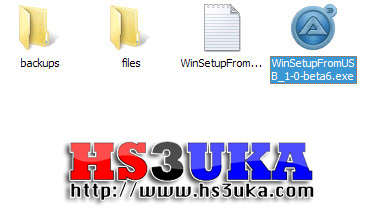
เปิดโปรแกรม WinSetupFromUSB_1-0-beta6.exe

เลือก Drive ที่ต้องการติดตั้ง
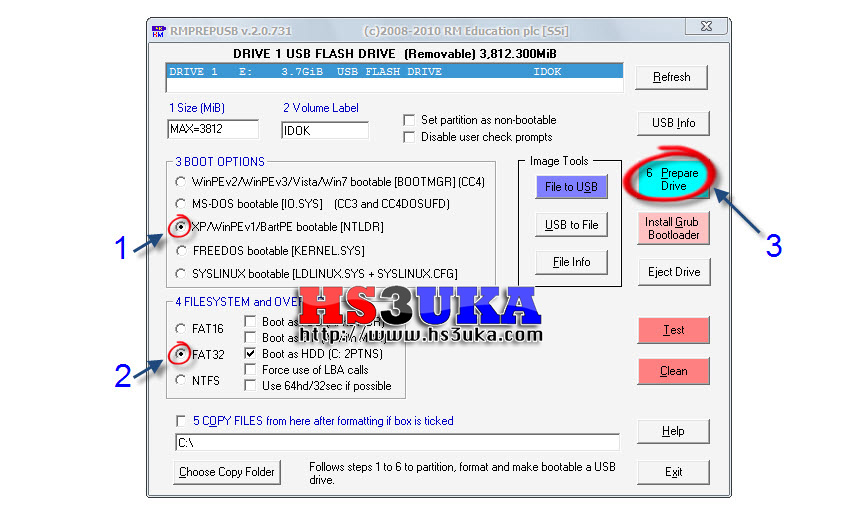
เลือกประเภทระบบปฎิบัติการ

กด OK
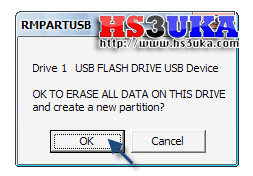
กด OK
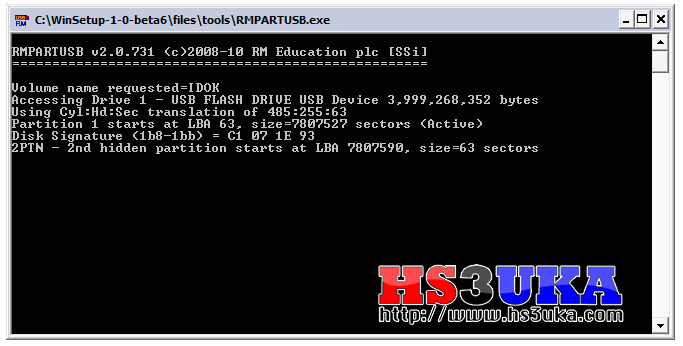
จอนี้จะดับไปเองเป็นการเสร็จสิ้นการ Format
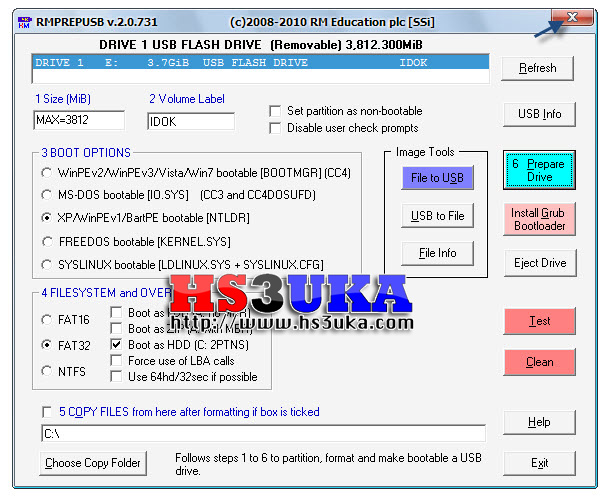
ปิดหน้าต่างนี้ไปได้เลย

เลือกแผ่น Windows XP ที่ต้องการ
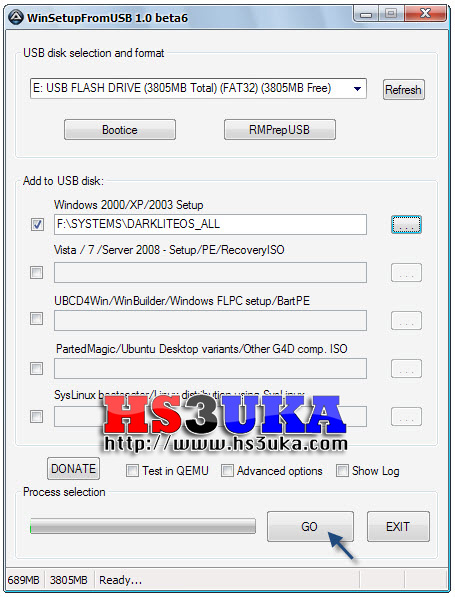
กด GO เพื่อเริ่มกระบวนการ
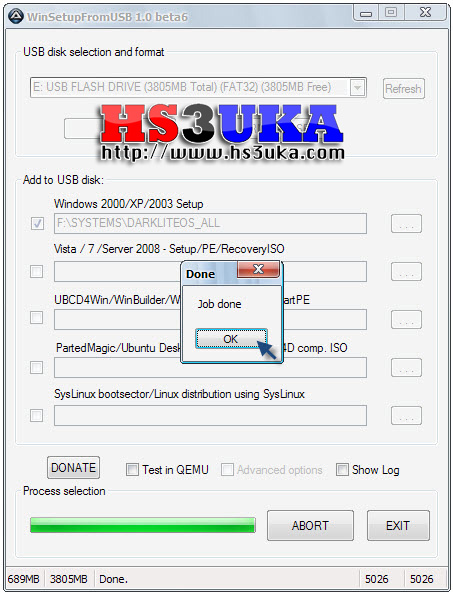
เสร็จแล้ว
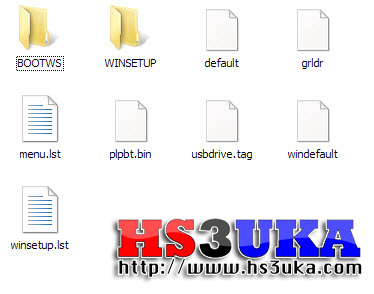
ไฟล์ใน USB Flash Drive ที่พร้อมใช้
ตัวอย่างวิธีปรับแต่ง BIOS เพื่อลงวินโดวผ่านทาง USB
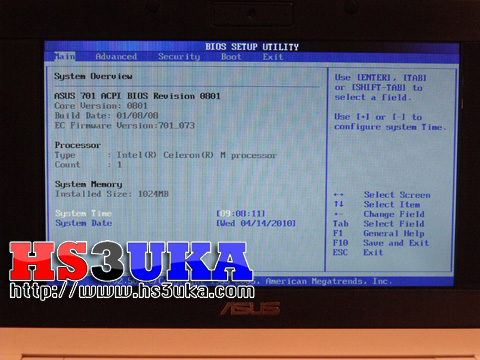
เข้าไปที่หน้า BIOS เพื่อตั้งค่า Boot
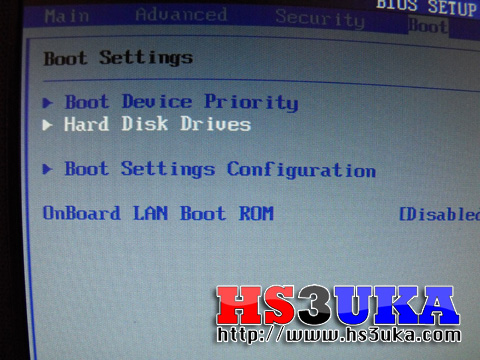
ตั้ง Hard Disk Drives
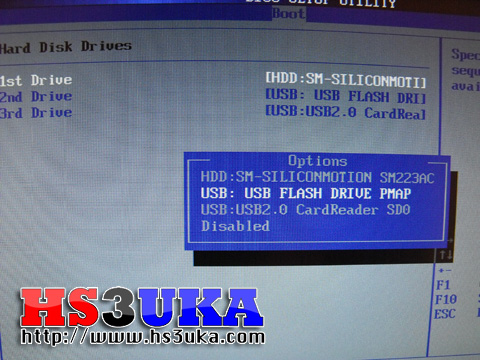
เลือก 1st Drive เป็น USB Flash Drive

ตั้ง Boot Device Priority
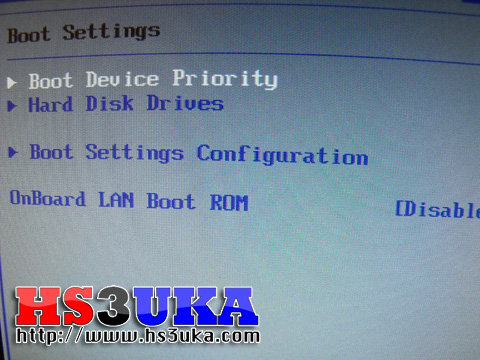
เลือก Boot Device Priority
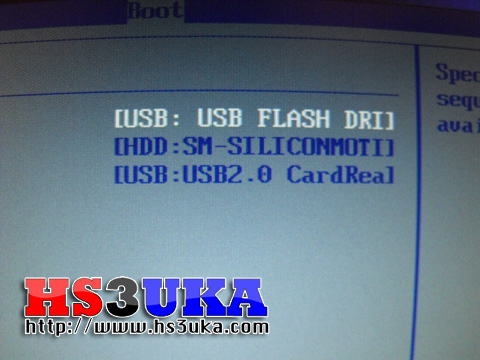
USB Flash Drive
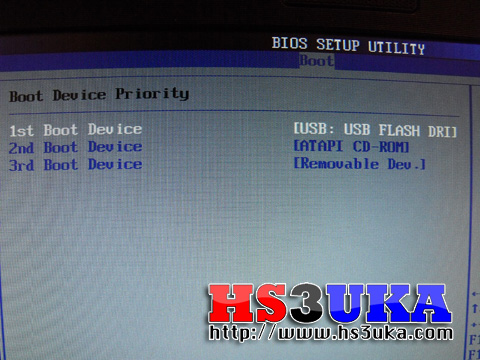
USB Flash Drive
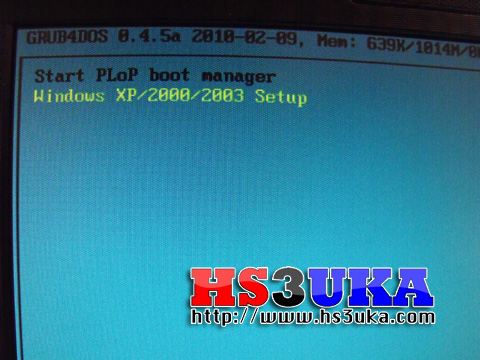
แบบนี้แปลว่า Boot ได้
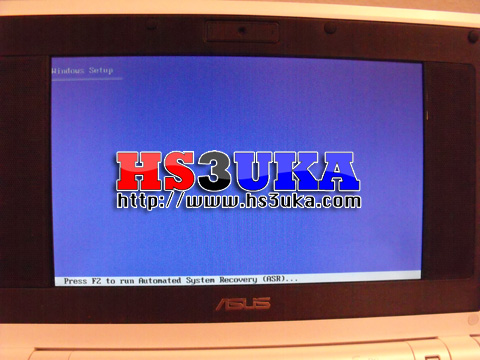
ลงวินโดวตามขั้นตอนปกติ
ติดตั้ง Windows 7 ด้วย USB Flash Drive (work! 100%)
ติดตั้ง Windows 7 ด้วย USB Flash Drive (work! 100%)
ภาคต่อจากตอนที่แล้ว หลังจากที่ได้แนะนำวิธีลง Windows xp ด้วย USB Flash Drive ไปแล้ว วันนี้จะมาแนะนำวิธีลง Windows 7 ด้วย USB Flash Drive กันครับ ด้วยโปรแกรมที่มีชื่อว่า Windows 7 USB DVD Download Tool จึงช่วยให้เราติดตั้ง Windows 7 ได้อย่างง่ายดายกว่าเดิม สำหรับบทความนี้คงไม่ต้องกังวลว่าเครื่องจะรองรับการบูทผ่าน USB หรือเปล่า เพราะแน่นอนอยู่แล้วว่าเครื่องที่ท่านจะลง Windows 7 นั้นไม่ใช่เครื่องเก่าแก่โบราณแน่ๆ
ก่อนอื่นต้องดาวน์โหลดโปรแกรม Windows 7 USB DVD Download Tool กันก่อน
Mirror 1 : http://www.mediafire.com/?n51hhxeado2yca1
ขั้นตอนการทำ USB Flash Drive
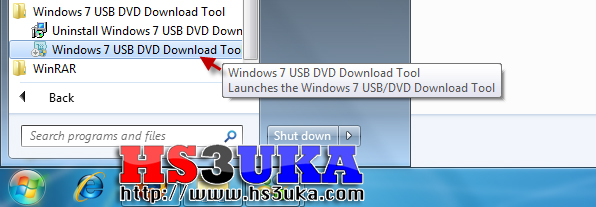
เปิดโปรแกรม Windows 7 USB DVD Download Tool
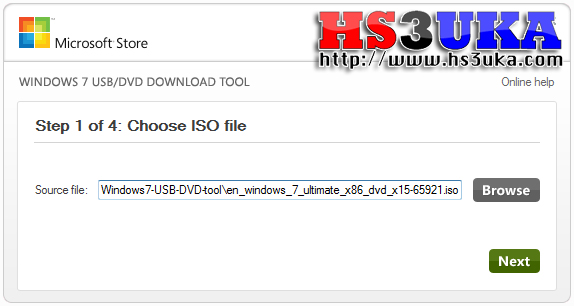
เลือกไฟล์ iso ของแผ่น Windows 7
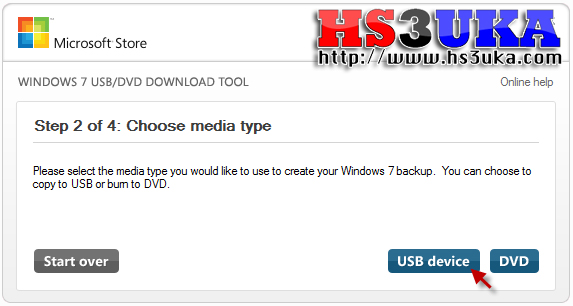
เลือก USB Device
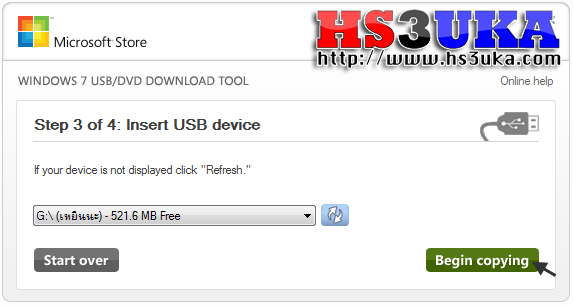
เลือก Flash Drive ปลายทางแล้วกด Being copying
วันเสาร์ที่ 4 มิถุนายน พ.ศ. 2554
delphi ตัวอย่างการตรวจสอบ version และ update โปรแกรม
unit frmMain;
interface
{$WARN SYMBOL_PLATFORM OFF}
uses
Forms, Windows, Classes, Controls, StdCtrls, ExtCtrls,
dxCore, dxButton, WinInet, Gauges, SysUtils, Dialogs;
type
TfrmLiveUpdate = class(TForm)
lblVersion: TLabel;
btnNext: TdxButton;
lblToDo: TLabel;
bvlBevel1: TBevel;
lblStatus: TLabel;
gauDownload: TGauge;
btnCancel: TdxButton;
bvlBevel2: TBevel;
lblWhatsNew: TLabel;
procedure FormPaint(Sender: TObject);
procedure FormCreate(Sender: TObject);
procedure btnNextClick(Sender: TObject);
procedure btnCancelClick(Sender: TObject);
procedure FormCloseQuery(Sender: TObject; var CanClose: Boolean);
procedure FormClose(Sender: TObject; var Action: TCloseAction);
{ Steps }
procedure CheckForUpdates;
procedure DownloadUpdate;
procedure InstallUpdate;
private
{ Private declarations }
NumStep: Byte;
IndexFileName: String;
PatchFileName: String;
TheFile: TStringList;
public
{ Public declarations }
end;
const
NewVersionLine : Byte = 0;
FileSizeLine : Byte = 1;
FileNameLine : Byte = 2;
var
frmLiveUpdate: TfrmLiveUpdate;
CurVer: String[5];
implementation
{$R *.dfm}
function RunAndWait(const TheApp: String; const Wait: Boolean): Boolean;
var
CmdLine: Array[0..255] Of char;
StartupInfo: TStartupInfo;
ProcessInfo: TProcessInformation;
begin
Result := False;
StrPCopy(CmdLine, TheApp);
FillChar(StartupInfo, SizeOf(StartupInfo), 0);
StartupInfo.cb := SizeOf(StartupInfo);
StartupInfo.dwFlags := STARTF_USESHOWWINDOW;
StartupInfo.wShowWindow := SW_SHOWNORMAL;
If CreateProcess(Nil, CmdLine, Nil, Nil, False, NORMAL_PRIORITY_CLASS, Nil, Nil, StartupInfo, ProcessInfo) Then Begin
Result := True;
If Wait Then
WaitForSingleObject(ProcessInfo.hThread, INFINITE);
CloseHandle(ProcessInfo.hThread);
CloseHandle(ProcessInfo.hProcess);
end;
end;
function DownloadFile(Const Source, Dest: String; Const ToLabel: TLabel = Nil; Const PrgBar: TGauge = Nil): Boolean;
var
NetHandle: HINTERNET;
UrlHandle: HINTERNET;
Buffer: Array[0..1024] Of Char;
BytesRead, Reserved: dWord;
ReadFile: String;
NumByte: Integer;
FileSize: dWord;
begin
ReadFile := '';
ToLabel.Caption := 'Connecting...';
Application.ProcessMessages;
NetHandle := InternetOpen('Delphi 5.x', INTERNET_OPEN_TYPE_PRECONFIG, Nil, Nil, 0);
If Assigned(NetHandle) Then Begin
UrlHandle := InternetOpenUrl(NetHandle, PChar(Source), Nil, 0, INTERNET_FLAG_RELOAD, 0);
If Assigned(UrlHandle) Then Begin
If (ToLabel <> Nil) Or (PrgBar <> Nil) Then Begin
Buffer := '';
FileSize := SizeOf(Buffer);
Reserved := 0;
If HttpQueryInfo(UrlHandle, HTTP_QUERY_CONTENT_LENGTH, @Buffer, FileSize, Reserved) Then
FileSize := StrToIntDef(Buffer, -1);
End;
If ToLabel <> Nil Then
ToLabel.Caption := '0 of 0 bytes';
If PrgBar <> Nil Then Begin
PrgBar.MinValue := 0;
PrgBar.MaxValue := FileSize;
PrgBar.Progress := 0;
End;
FillChar(Buffer, SizeOf(Buffer), 0);
Repeat
FillChar(Buffer, SizeOf(Buffer), 0);
InternetReadFile(UrlHandle, @Buffer, SizeOf(Buffer), BytesRead);
For NumByte := 0 To BytesRead - 1 Do
ReadFile := Concat(ReadFile, Buffer[NumByte]);
If ToLabel <> Nil Then
ToLabel.Caption := FormatFloat('0,000', Length(ReadFile)) + ' of ' + FormatFloat('0,000', FileSize) + ' bytes';
If PrgBar <> Nil Then
PrgBar.Progress := PrgBar.Progress + StrToInt(IntToStr(BytesRead));
Application.ProcessMessages;
Until BytesRead = 0;
InternetCloseHandle(UrlHandle);
End;
InternetCloseHandle(NetHandle);
End;
ToLabel.Caption := '';
Application.ProcessMessages;
If Length(ReadFile) > 0 Then
Begin
If FileExists(Dest) Then
DeleteFile(PChar(Dest));
With TFileStream.Create(Dest, fmCreate) Do
Try
Write(ReadFile[1], Length(ReadFile));
Finally
Free;
End;
Result := True;
End
Else
Result := False;
end;
procedure DeleteAllDir(Path, Mask: String; Recursive: Boolean);
var
Result: Integer;
SearchRec: TSearchRec;
begin
If Path[Length(Path)] <> '\' Then
Path := Concat(Path, '\');
Try
Result := FindFirst(Path + Mask, faAnyFile - faDirectory, SearchRec);
While Result = 0 Do Begin
If Not DeleteFile(Path + SearchRec.Name) Then Begin
FileSetAttr(Path + SearchRec.Name, 0); { reset all flags }
DeleteFile(Path + SearchRec.Name);
End;
Result := FindNext(SearchRec);
End;
FindClose(SearchRec);
If Not Recursive Then Exit;
Result := FindFirst(Path + '*.*', faDirectory, SearchRec);
While Result = 0 Do Begin
If (SearchRec.Name <> '.') And (SearchRec.Name <> '..') Then Begin
FileSetAttr(Path + SearchRec.Name, faDirectory);
DeleteAllDir(Path + SearchRec.Name + '\', Mask, True);
RmDir(Path + SearchRec.Name);
End;
Result := FindNext(SearchRec);
End;
FindClose(SearchRec);
Except
MessageDlg('The directory could not be deleted.', mtError, [mbOk], 0);
End;
end;
procedure TfrmLiveUpdate.FormPaint(Sender: TObject);
const
Red1 : Byte = 146;
Red2 : Byte = 186;
Green1 : Byte = 157;
Green2 : Byte = 197;
Blue1 : Byte = 210;
Blue2 : Byte = 250;
var
HalfHeight: Integer;
Row: Integer;
begin
HalfHeight := ClientHeight Div 2;
For Row := 0 To HalfHeight Do
With Canvas Do Begin
Brush.Color := RGB(
Red1 + Round((Red2 - Red1) / HalfHeight * Row),
Green1 + Round((Green2 - Green1) / HalfHeight * Row),
Blue1 + Round((Blue2 - Blue1) / HalfHeight * Row));
FillRect(Rect(0, Row, ClientWidth, Row + 1));
End;
For Row := HalfHeight + 1 To ClientHeight Do
With Canvas Do Begin
Brush.Color := RGB(
Red2 - Round((Red2 - Red1) / HalfHeight * (Row - HalfHeight)),
Green2 - Round((Green2 - Green1) / HalfHeight * (Row - HalfHeight)),
Blue2 - Round((Blue2 - Blue1) / HalfHeight * (Row - HalfHeight)));
FillRect(Rect(0, Row, ClientWidth, Row + 1));
End;
end;
procedure TfrmLiveUpdate.FormCreate(Sender: TObject);
begin
NumStep := 1;
end;
procedure TfrmLiveUpdate.CheckForUpdates;
var
FromFile: String;
InternetVer: String[5];
NumLine: Byte;
HistoryFile: TStringList;
label EndOfProc;
begin
lblToDo.Caption := '';
FromFile := CurVer[1] + CurVer[3] + CurVer[4];
FromFile := 'http://www.myprog.com/Updates/' + FromFile + '/Version.txt';
IndexFileName := ExtractFilePath(Application.ExeName) + '~UpdInfo.txt';
Application.ProcessMessages;
Try
lblStatus.Caption := 'Checking for updates...';
Application.ProcessMessages;
If Not DownloadFile(FromFile, IndexFileName) Then Begin
MessageDlg('Live-update couldn''t retrieve the catalog file of available updates. Please check that your connection to the Internet in functioning correctly and retry.', mtError, [mbOk], 0);
GoTo EndOfProc;
End;
TheFile := TStringList.Create;
TheFile.LoadFromFile(IndexFileName);
InternetVer := TheFile[NewVersionLine];
If Length(CurVer) < 4 Then
CurVer := CurVer + '0';
If Length(InternetVer) < 4 Then
InternetVer := InternetVer + '0';
lblStatus.Caption := '';
If InternetVer > CurVer Then
Begin
Inc(NumStep);
lblStatus.Caption := 'Downloading history...';
lblToDo.Caption := 'A new version (' + InternetVer + ') is available.' + #10 +
'The size of the patch is: ' + FormatFloat('#,##0', StrToInt(TheFile[
FileSizeLine]) / 1024) + ' KB.' + #10#10 + 'Click "Next" to download.';
bvlBevel2.Visible := True;
FromFile := ChangeFileExt(FromFile, '.his');
If DownloadFile(FromFile, ChangeFileExt(IndexFileName, '.his')) Then Begin
HistoryFile := TStringList.Create;
HistoryFile.LoadFromFile(ChangeFileExt(IndexFileNa me, '.his'));
For NumLine := 0 To HistoryFile.Count - 1 Do
lblWhatsNew.Caption := lblWhatsNew.Caption + HistoryFile[NumLine] + #10;
HistoryFile.Free;
End;
End
Else
Begin
If InternetVer = CurVer Then
MessageDlg('You have the most recent version of MyProg.', mtInformation, [mbOk], 0)
Else
MessageDlg('Your version is newer than on the Internet.', mtInformation, [mbOk], 0);
End;
EndOfProc:
lblStatus.Caption := '';
Except
MessageDlg('Sorry, I am unable to check for a new version. Make sure you are connected to the Internet.', mtError, [mbOk], 0);
lblStatus.Caption := '';
End;
end;
procedure TfrmLiveUpdate.DownloadUpdate;
label EndOfProc;
begin
Try
lblToDo.Caption := '';
lblWhatsNew.Caption := '';
lblStatus.Caption := 'Downloading...';
PatchFileName := TheFile[FileNameLine];
While Pos('/', PatchFileName) > 0 Do
Delete(PatchFileName, 1, Pos('/', PatchFileName));
Application.ProcessMessages;
gauDownload.Visible := True;
If Not DownloadFile(TheFile[FileNameLine], ExtractFilePath(Application.ExeName) + PatchFileName, Nil, gauDownload) Then
MessageDlg('Live-update couldn''t downlaod the patch. Please check that your connection to the Internet in functioning correctly and retry.', mtError, [mbOk], 0)
Else
Begin
lblToDo.Caption := 'The patch was downloaded successfully.';
InstallUpdate;
Inc(NumStep);
End;
gauDownload.Visible := False;
EndOfProc:
lblStatus.Caption := '';
Except
MessageDlg('Live-update couldn''t retrieve the catalog file of available updates. Please check that your connection to the Internet in functioning correctly and retry.', mtError, [mbOk], 0);
End;
end;
procedure TfrmLiveUpdate.InstallUpdate;
begin
If MessageDlg('The patch was downloaded successfully to "' + ExtractFileDir(Application.ExeName) + '". Would you like to run it now?', mtConfirmation, [mbYes, mbNo], 0) = mrYes Then Begin
Hide;
RunAndWait(ExtractFilePath(Application.ExeName) + PatchFileName, True);
If MessageDlg('Would you like to delete the patch (' + ExtractFilePath(Application.ExeName) + PatchFileName + ')?', mtConfirmation, [mbYes, mbNo], 0) = mrYes Then
DeleteFile(ExtractFilePath(Application.ExeName) + PatchFileName);
Show;
End;
btnNext.Visible := False;
btnCancel.Caption := 'Close';
end;
procedure TfrmLiveUpdate.btnNextClick(Sender: TObject);
begin
btnNext.Enabled := False;
btnCancel.Enabled := False;
Screen.Cursor := crHourGlass;
Case NumStep Of
1: CheckForUpdates;
2: DownloadUpdate;
End;
Screen.Cursor := crDefault;
btnCancel.Enabled := True;
If btnNext.Visible Then
Begin
btnNext.Enabled := True;
btnNext.SetFocus;
End
Else
Begin
btnCancel.Enabled := True;
btnCancel.SetFocus;
End;
end;
procedure TfrmLiveUpdate.btnCancelClick(Sender: TObject);
begin
Close;
end;
procedure TfrmLiveUpdate.FormCloseQuery(Sender: TObject; var CanClose: Boolean);
begin
If btnNext.Visible Then
CanClose := MessageDlg('Are you sure you want to cancel Live-Update?', mtConfirmation, [mbYes, mbNo], 0) = mrYes
Else
CanClose := True;
end;
procedure TfrmLiveUpdate.FormClose(Sender: TObject;
var Action: TCloseAction);
begin
DeleteAllDir(ExtractFileDir(Application.ExeName), '~*.*', False);
Try TheFile.Free; Except End;
end;
end.
------
interface
{$WARN SYMBOL_PLATFORM OFF}
uses
Forms, Windows, Classes, Controls, StdCtrls, ExtCtrls,
dxCore, dxButton, WinInet, Gauges, SysUtils, Dialogs;
type
TfrmLiveUpdate = class(TForm)
lblVersion: TLabel;
btnNext: TdxButton;
lblToDo: TLabel;
bvlBevel1: TBevel;
lblStatus: TLabel;
gauDownload: TGauge;
btnCancel: TdxButton;
bvlBevel2: TBevel;
lblWhatsNew: TLabel;
procedure FormPaint(Sender: TObject);
procedure FormCreate(Sender: TObject);
procedure btnNextClick(Sender: TObject);
procedure btnCancelClick(Sender: TObject);
procedure FormCloseQuery(Sender: TObject; var CanClose: Boolean);
procedure FormClose(Sender: TObject; var Action: TCloseAction);
{ Steps }
procedure CheckForUpdates;
procedure DownloadUpdate;
procedure InstallUpdate;
private
{ Private declarations }
NumStep: Byte;
IndexFileName: String;
PatchFileName: String;
TheFile: TStringList;
public
{ Public declarations }
end;
const
NewVersionLine : Byte = 0;
FileSizeLine : Byte = 1;
FileNameLine : Byte = 2;
var
frmLiveUpdate: TfrmLiveUpdate;
CurVer: String[5];
implementation
{$R *.dfm}
function RunAndWait(const TheApp: String; const Wait: Boolean): Boolean;
var
CmdLine: Array[0..255] Of char;
StartupInfo: TStartupInfo;
ProcessInfo: TProcessInformation;
begin
Result := False;
StrPCopy(CmdLine, TheApp);
FillChar(StartupInfo, SizeOf(StartupInfo), 0);
StartupInfo.cb := SizeOf(StartupInfo);
StartupInfo.dwFlags := STARTF_USESHOWWINDOW;
StartupInfo.wShowWindow := SW_SHOWNORMAL;
If CreateProcess(Nil, CmdLine, Nil, Nil, False, NORMAL_PRIORITY_CLASS, Nil, Nil, StartupInfo, ProcessInfo) Then Begin
Result := True;
If Wait Then
WaitForSingleObject(ProcessInfo.hThread, INFINITE);
CloseHandle(ProcessInfo.hThread);
CloseHandle(ProcessInfo.hProcess);
end;
end;
function DownloadFile(Const Source, Dest: String; Const ToLabel: TLabel = Nil; Const PrgBar: TGauge = Nil): Boolean;
var
NetHandle: HINTERNET;
UrlHandle: HINTERNET;
Buffer: Array[0..1024] Of Char;
BytesRead, Reserved: dWord;
ReadFile: String;
NumByte: Integer;
FileSize: dWord;
begin
ReadFile := '';
ToLabel.Caption := 'Connecting...';
Application.ProcessMessages;
NetHandle := InternetOpen('Delphi 5.x', INTERNET_OPEN_TYPE_PRECONFIG, Nil, Nil, 0);
If Assigned(NetHandle) Then Begin
UrlHandle := InternetOpenUrl(NetHandle, PChar(Source), Nil, 0, INTERNET_FLAG_RELOAD, 0);
If Assigned(UrlHandle) Then Begin
If (ToLabel <> Nil) Or (PrgBar <> Nil) Then Begin
Buffer := '';
FileSize := SizeOf(Buffer);
Reserved := 0;
If HttpQueryInfo(UrlHandle, HTTP_QUERY_CONTENT_LENGTH, @Buffer, FileSize, Reserved) Then
FileSize := StrToIntDef(Buffer, -1);
End;
If ToLabel <> Nil Then
ToLabel.Caption := '0 of 0 bytes';
If PrgBar <> Nil Then Begin
PrgBar.MinValue := 0;
PrgBar.MaxValue := FileSize;
PrgBar.Progress := 0;
End;
FillChar(Buffer, SizeOf(Buffer), 0);
Repeat
FillChar(Buffer, SizeOf(Buffer), 0);
InternetReadFile(UrlHandle, @Buffer, SizeOf(Buffer), BytesRead);
For NumByte := 0 To BytesRead - 1 Do
ReadFile := Concat(ReadFile, Buffer[NumByte]);
If ToLabel <> Nil Then
ToLabel.Caption := FormatFloat('0,000', Length(ReadFile)) + ' of ' + FormatFloat('0,000', FileSize) + ' bytes';
If PrgBar <> Nil Then
PrgBar.Progress := PrgBar.Progress + StrToInt(IntToStr(BytesRead));
Application.ProcessMessages;
Until BytesRead = 0;
InternetCloseHandle(UrlHandle);
End;
InternetCloseHandle(NetHandle);
End;
ToLabel.Caption := '';
Application.ProcessMessages;
If Length(ReadFile) > 0 Then
Begin
If FileExists(Dest) Then
DeleteFile(PChar(Dest));
With TFileStream.Create(Dest, fmCreate) Do
Try
Write(ReadFile[1], Length(ReadFile));
Finally
Free;
End;
Result := True;
End
Else
Result := False;
end;
procedure DeleteAllDir(Path, Mask: String; Recursive: Boolean);
var
Result: Integer;
SearchRec: TSearchRec;
begin
If Path[Length(Path)] <> '\' Then
Path := Concat(Path, '\');
Try
Result := FindFirst(Path + Mask, faAnyFile - faDirectory, SearchRec);
While Result = 0 Do Begin
If Not DeleteFile(Path + SearchRec.Name) Then Begin
FileSetAttr(Path + SearchRec.Name, 0); { reset all flags }
DeleteFile(Path + SearchRec.Name);
End;
Result := FindNext(SearchRec);
End;
FindClose(SearchRec);
If Not Recursive Then Exit;
Result := FindFirst(Path + '*.*', faDirectory, SearchRec);
While Result = 0 Do Begin
If (SearchRec.Name <> '.') And (SearchRec.Name <> '..') Then Begin
FileSetAttr(Path + SearchRec.Name, faDirectory);
DeleteAllDir(Path + SearchRec.Name + '\', Mask, True);
RmDir(Path + SearchRec.Name);
End;
Result := FindNext(SearchRec);
End;
FindClose(SearchRec);
Except
MessageDlg('The directory could not be deleted.', mtError, [mbOk], 0);
End;
end;
procedure TfrmLiveUpdate.FormPaint(Sender: TObject);
const
Red1 : Byte = 146;
Red2 : Byte = 186;
Green1 : Byte = 157;
Green2 : Byte = 197;
Blue1 : Byte = 210;
Blue2 : Byte = 250;
var
HalfHeight: Integer;
Row: Integer;
begin
HalfHeight := ClientHeight Div 2;
For Row := 0 To HalfHeight Do
With Canvas Do Begin
Brush.Color := RGB(
Red1 + Round((Red2 - Red1) / HalfHeight * Row),
Green1 + Round((Green2 - Green1) / HalfHeight * Row),
Blue1 + Round((Blue2 - Blue1) / HalfHeight * Row));
FillRect(Rect(0, Row, ClientWidth, Row + 1));
End;
For Row := HalfHeight + 1 To ClientHeight Do
With Canvas Do Begin
Brush.Color := RGB(
Red2 - Round((Red2 - Red1) / HalfHeight * (Row - HalfHeight)),
Green2 - Round((Green2 - Green1) / HalfHeight * (Row - HalfHeight)),
Blue2 - Round((Blue2 - Blue1) / HalfHeight * (Row - HalfHeight)));
FillRect(Rect(0, Row, ClientWidth, Row + 1));
End;
end;
procedure TfrmLiveUpdate.FormCreate(Sender: TObject);
begin
NumStep := 1;
end;
procedure TfrmLiveUpdate.CheckForUpdates;
var
FromFile: String;
InternetVer: String[5];
NumLine: Byte;
HistoryFile: TStringList;
label EndOfProc;
begin
lblToDo.Caption := '';
FromFile := CurVer[1] + CurVer[3] + CurVer[4];
FromFile := 'http://www.myprog.com/Updates/' + FromFile + '/Version.txt';
IndexFileName := ExtractFilePath(Application.ExeName) + '~UpdInfo.txt';
Application.ProcessMessages;
Try
lblStatus.Caption := 'Checking for updates...';
Application.ProcessMessages;
If Not DownloadFile(FromFile, IndexFileName) Then Begin
MessageDlg('Live-update couldn''t retrieve the catalog file of available updates. Please check that your connection to the Internet in functioning correctly and retry.', mtError, [mbOk], 0);
GoTo EndOfProc;
End;
TheFile := TStringList.Create;
TheFile.LoadFromFile(IndexFileName);
InternetVer := TheFile[NewVersionLine];
If Length(CurVer) < 4 Then
CurVer := CurVer + '0';
If Length(InternetVer) < 4 Then
InternetVer := InternetVer + '0';
lblStatus.Caption := '';
If InternetVer > CurVer Then
Begin
Inc(NumStep);
lblStatus.Caption := 'Downloading history...';
lblToDo.Caption := 'A new version (' + InternetVer + ') is available.' + #10 +
'The size of the patch is: ' + FormatFloat('#,##0', StrToInt(TheFile[
FileSizeLine]) / 1024) + ' KB.' + #10#10 + 'Click "Next" to download.';
bvlBevel2.Visible := True;
FromFile := ChangeFileExt(FromFile, '.his');
If DownloadFile(FromFile, ChangeFileExt(IndexFileName, '.his')) Then Begin
HistoryFile := TStringList.Create;
HistoryFile.LoadFromFile(ChangeFileExt(IndexFileNa me, '.his'));
For NumLine := 0 To HistoryFile.Count - 1 Do
lblWhatsNew.Caption := lblWhatsNew.Caption + HistoryFile[NumLine] + #10;
HistoryFile.Free;
End;
End
Else
Begin
If InternetVer = CurVer Then
MessageDlg('You have the most recent version of MyProg.', mtInformation, [mbOk], 0)
Else
MessageDlg('Your version is newer than on the Internet.', mtInformation, [mbOk], 0);
End;
EndOfProc:
lblStatus.Caption := '';
Except
MessageDlg('Sorry, I am unable to check for a new version. Make sure you are connected to the Internet.', mtError, [mbOk], 0);
lblStatus.Caption := '';
End;
end;
procedure TfrmLiveUpdate.DownloadUpdate;
label EndOfProc;
begin
Try
lblToDo.Caption := '';
lblWhatsNew.Caption := '';
lblStatus.Caption := 'Downloading...';
PatchFileName := TheFile[FileNameLine];
While Pos('/', PatchFileName) > 0 Do
Delete(PatchFileName, 1, Pos('/', PatchFileName));
Application.ProcessMessages;
gauDownload.Visible := True;
If Not DownloadFile(TheFile[FileNameLine], ExtractFilePath(Application.ExeName) + PatchFileName, Nil, gauDownload) Then
MessageDlg('Live-update couldn''t downlaod the patch. Please check that your connection to the Internet in functioning correctly and retry.', mtError, [mbOk], 0)
Else
Begin
lblToDo.Caption := 'The patch was downloaded successfully.';
InstallUpdate;
Inc(NumStep);
End;
gauDownload.Visible := False;
EndOfProc:
lblStatus.Caption := '';
Except
MessageDlg('Live-update couldn''t retrieve the catalog file of available updates. Please check that your connection to the Internet in functioning correctly and retry.', mtError, [mbOk], 0);
End;
end;
procedure TfrmLiveUpdate.InstallUpdate;
begin
If MessageDlg('The patch was downloaded successfully to "' + ExtractFileDir(Application.ExeName) + '". Would you like to run it now?', mtConfirmation, [mbYes, mbNo], 0) = mrYes Then Begin
Hide;
RunAndWait(ExtractFilePath(Application.ExeName) + PatchFileName, True);
If MessageDlg('Would you like to delete the patch (' + ExtractFilePath(Application.ExeName) + PatchFileName + ')?', mtConfirmation, [mbYes, mbNo], 0) = mrYes Then
DeleteFile(ExtractFilePath(Application.ExeName) + PatchFileName);
Show;
End;
btnNext.Visible := False;
btnCancel.Caption := 'Close';
end;
procedure TfrmLiveUpdate.btnNextClick(Sender: TObject);
begin
btnNext.Enabled := False;
btnCancel.Enabled := False;
Screen.Cursor := crHourGlass;
Case NumStep Of
1: CheckForUpdates;
2: DownloadUpdate;
End;
Screen.Cursor := crDefault;
btnCancel.Enabled := True;
If btnNext.Visible Then
Begin
btnNext.Enabled := True;
btnNext.SetFocus;
End
Else
Begin
btnCancel.Enabled := True;
btnCancel.SetFocus;
End;
end;
procedure TfrmLiveUpdate.btnCancelClick(Sender: TObject);
begin
Close;
end;
procedure TfrmLiveUpdate.FormCloseQuery(Sender: TObject; var CanClose: Boolean);
begin
If btnNext.Visible Then
CanClose := MessageDlg('Are you sure you want to cancel Live-Update?', mtConfirmation, [mbYes, mbNo], 0) = mrYes
Else
CanClose := True;
end;
procedure TfrmLiveUpdate.FormClose(Sender: TObject;
var Action: TCloseAction);
begin
DeleteAllDir(ExtractFileDir(Application.ExeName), '~*.*', False);
Try TheFile.Free; Except End;
end;
end.
------
วันศุกร์ที่ 3 มิถุนายน พ.ศ. 2554
stack overflow มันคืออะไร
stack overflow มักจะเกิดจากการทำ recursion มากเกินไป
เช่นการเรียกฟังก์ชันเดิมวนซ้ำไม่สิ้นสุด หรือการใช้วงเล็บมากกว่าขีดจำกัดของภาษา
ทำให้ stack ที่รอการคืนค่าจากฟังก์ชันเกิดเต็มขึ้นมา
at line 0 ก็คือบรรทัดที่ 0 (บรรทัดแรก)
เช่นการเรียกฟังก์ชันเดิมวนซ้ำไม่สิ้นสุด หรือการใช้วงเล็บมากกว่าขีดจำกัดของภาษา
ทำให้ stack ที่รอการคืนค่าจากฟังก์ชันเกิดเต็มขึ้นมา
at line 0 ก็คือบรรทัดที่ 0 (บรรทัดแรก)
วันพุธที่ 11 พฤษภาคม พ.ศ. 2554
การ Config Squid.conf
การ Config Squid.conf
1. การจำกัดเวลาลูกข่ายใช้อินเตอร์เน็ต
acl acl_net src 172.17.8.0/24 // วงที่ออกเน็ตได้
acl acl_client src 172.17.8.10 // IP ที่ต้องการห้ามออกเน็ตเป็นเวลา
acl acl_time time MTWHF 17:00-23:59
acl acl_time2 time MTWHF 0:00-7:00
http_access deny acl_client acl_time
http_access deny acl_client acl_time2
http_access allow acl_net
(M จันทร์ T อังคาร W พุธ H พฤหัส F ศุกร์ A เสาร์ S อาทิตย์)
2. การบล็อค MSN
คำตอบ ให้เพิ่ม เข้าไปใน squid.conf ส่วนของ ACCESS CONTROL
acl chatMSN req_mime_type -i ^application/x-msn-messenger$
http_reply_access deny chatMSN
acl msn1 req_mime_type -i ^application/x-msn-messenger$ //รุ่น 6.3
acl msn2 url_regex -i gateway.dll // รุ่น 7.X +
http_access deny msn1
http_access deny msn2
หรือถ้าต้องการblock เป็นเวลา สามารถกำหนดดังนี้
acl msn1 rep_mime_type -i ^application/x-msn-messenger$
acl msn2 url_regex -i gateway.dll
acl morning time M T W H F 9:00-12:00
acl lunch time M T W H F 13:00-17:00
http_access deny msn1 morning
http_access deny msn1 lunch
http_access deny msn2 morning
http_access deny msn2 lunch
3. Block site (Domain)
acl block_url url_regex ‘etc/squid/blacklists’ //สร้างไฟล์ blacklist.txt
http_access deny block_url
(พิมพ์ชื่อ Domain ที่ต้องการบล๊อคส่ในแฟ้มที่สร้าง)
4. Block Key word
acl keyword url_regex -i messenger hi5 chat
http_access deny keyword
5. Block MP3 Download
acl download urlpath_regex -i \.mp4$ \.wav$ \.iso$
http_access deny download
6. การจำกัด bandwidth Download
acl blockfile url_regex -i ftp .exe .mp3 .vqf .tar.gz .gz .rpm .zip .rar .avi .mpeg .mpe .mpg .qt .ram
.rm .iso
acl all src 0.0.0.0/0.0.0.0
acl manager proto cache_object
acl localhost src 127.0.0.1/255.255.255.255
acl lan src 192.168.1.0/255.255.255.0 #กลุ่ม IP LAN ภายใน
http_access allow lan
http_access deny all
delay_pools 1
delay_class 1 1
delay_parameters 1 2500/2500 # จำกัดไม่เกิน 2.5 kbyte หากต้องการไม่เกิน 5.0 kbyte ก็เปลี่ยนเป็น 5000/5000 ไม่เกิน จะจำกัดเท่าไหร่ก็เปลี่ยนเอาเลยครับ
delay_access 1 allow blockfile
7. การ download จาก ตัวอักษรหรือคำจาก website
acl magic_words url_regx -i .exe
delay_pools 1
delay_class 1 1
delay_parameters 1 4000/4000
delay_access 1 allow magic_words
(magic_world เป็นตัวแปลบออกว่าถ้ามีนามสกุล .exe (ส่วน -i คือ ตัวบอกว่าเป็น case-insensitive) ให้ download มาด้วยความเร็วไม่เกิน 32 Kbit/sec ก็ประมาณ 4 Kbyte/sec )
8. กำหนดให้ขนาด bandwidth ให้กับUser ภายใน network
acl all src 0.0.0.0/0.0.0.0
delay_pool_count 1
delay_class 1 2
delay_parameters 1 12500/12500 2500/2500
delay_access 1 allow all
( อธิบายว่า มี Lease Line ขนาด 128K และต้องการจะเหลือไว้สักนิด สำหรับ SMTP server ซึ่งเป็น IP จริงไม่ได้ต่อผ่านกับ gateway ตัวนี้ และให้ใช้สำหรับ NAT ภายใน องค์กร 100Kbit/sec เพื่อให้ทุกคน share กันใช้เท่าๆกัน และต้องการจะให้แต่ละคนใช้ Bandwidth ได้ไม่เกิน 2.5 Kbyte/sec )
9 กำหนดขนาด bandwidth ให้กับ group network
acl a_ll src 0.0.0.0/0.0.0.0
delay_class 1 3
delay_parameters 1 56000/56000 18750/18750 500/500
delay_access 1 allow all
(อธิบายได้ดังนี้ มี Lease Line ขนาด 512K และต้องการเหลือ Bandwidth สำหรับ SMTP ไว้ 8Kbyte/sec ใช้ภายใน network ไม่เกิน 448 Kbit/sec และแบ่งให้แต่ละ class ไม่เกิน 150 Kbit/sec และให้แต่ละ IP ไม่เกิน 4 Kbit/sec )
10. การจำกัดขนาด bandwidth และไม่จำกัดขนาด bandwidth
acl magic_words1 url_regex -i 202.29.14.1
#กำหนด acl กลุ่มที่มีสิทธิ์ทุกอย่าง acl magic_words2 url_regex -i ftp .exe .mp3 .vqf .tar.gz .gz .rpm .zip .rar .avi .mpeg .mpe .mpg .qt .ram .rm .iso .raw .wav .mov #กำหนด acl กลุ่มที่ต้องควบคุม traffic คือไฟล์บางประเภทที่ใหญ่ ๆ
การกำหนดค่า Squid(Delay Pool)
# สำหรับ delay pool ที่คุณต้องการ –enable-delay-pools
delay_pools 2 #กำหนดให้มี 2 pool ที่ต้องใช้
#สมมุติมี link ขนาด 2Mbits ซึ่ง 2 mbits == 256 kbytes ต่อวินาที เราจะจำกัดให้ใช้ได้ไม่เกิน 5 KB/s ต่อโหนด
delay_class 1 2 #กำหนดให้ pool ที่ 1 เป็น class 2 ที่ถูกกำหนดค่าไว้ใน magic_word2 แบบจำกัด
delay_parameters 1 256000/256000 5000/256000
delay_access 1 allow magic_words2 #กลุ่มที่ดาวน์โหนดไฟล์ต่าง ๆ ที่กำนดไว้
delay_access 1 allow rinet #กลุ่มที่มี ip ต้นทางเป็นเครือข่ายภายใน
# -1/-1 หมายความว่าไม่มีการจำกัดขนาดของ traffic.
delay_class 2 2 #กำหนดให้ pool ที่ 2 เป็น class 2 ที่ถูกกำหนดค่าไว้ใน magic_word1 แบบไม่จำกัด
delay_parameters 2 -1/-1 -1/-1
delay_access 2 allow magic_words1
ตัวอย่าง
acl download url_regex -i ftp .rar .wma .exe .mp3 .vqf .tar.gz .gz .rpm .zip .avi .mpeg .mpe .mpg .qt .ram .rm .iso .raw .wav .mov
delay_pools 2
acl day time 09:00-15:59
acl day2 time 16:00-09:00
delay_class 1 2
delay_parameters 1 10000/20000 10000/20000
delay_access 1 allow download day day2
delay_access 1 deny all
delay_class 2 2
delay_parameters 2 -1/-1 -1/-1
delay_access 2 allow localnet localhost !all
delay_access 2 deny !all
11. การบล็อค Port และ เลข IP
acl porttest port 5050 5222 5223
acl block_port port 5050 5222 5223
acl test src 172.27.162.43
http_access deny block_port test
http_access allow all
acl block_port port 5050 5222 5223
acl test src 172.27.162.43
http_access deny block_port test
http_access allow all
acl blockip src “/etc/squid/block.ip” //สร้างแฟ้ม block.ip ใส่เลข IP เข้าไป
12. Block skype Chat
acl skype_user src “/etc/squid/user-skype” //ใส่เลข ip เครื่องที่อนุญาตให้ใช้ได้
acl numeric_IPs url_regex ^[0-9]+.[0-9]+.[0-9]+.[0-9]+:443
acl Skype_UA browser ^skype^
http_access deny skype_user numeric_IPs
http_reply_access deny skype_user numeric_IPs
http_access deny skype_user Skype_UA
คำสั่งช่วยแก้ไฟล์ text linux
1. echo
2. seq - i
sed -i '' -e 's,ข้อความเดิม,ข้อความใหม่,g' ตำแหน่งที่อยู่ไฟล์ที่จะแก้ไข
2. seq - i
sed -i '' -e 's,ข้อความเดิม,ข้อความใหม่,g' ตำแหน่งที่อยู่ไฟล์ที่จะแก้ไข
MySQL Performance Tuning
MySQL Performance Tuning: Best Practices, FAQs, How-To, Articles, Blogs
Posted by: Edwin DeSouza ()
Date: May 25, 2006 10:50AM
Book: High Performance MySQL (2nd Edition)
http://www.highperfmysql.com/
MySQL Performance Tuning - Best Practices:
http://jpipes.com/presentations/perf_tuning_best_practices.pdf
MySQL Index Tuning and Coding Techniques for Optimal Performance:
http://jpipes.com/presentations/index_coding_optimization.pdf
Web Performance and Scalability with MySQL:
http://develooper.com/talks/
PHP Applications: 120 Performance Tuning screws for MySQL
http://blog.ulf-wendel.de/?p=268
http://blog.ulf-wendel.de/?p=163
MySQL Server Variables
http://forge.mysql.com/wiki/ServerVariables
MySQL Server Variables - SQL layer or Storage Engine specific
http://www.mysqlperformanceblog.com/2006/06/08/mysql-server-variables-sql-layer-or-storage-engine-specific/
“Show profile” + “Information_schema.profiling”
http://blogs.mysql.com/peterg/2008/11/06/show-profile-information_schemaprofiling/
PeterZ presentations:
http://www.mysqlperformanceblog.com/mysql-performance-presentations/
Using MMM to ALTER huge tables
http://www.mysqlperformanceblog.com/2008/03/27/using-mmm-to-alter-huge-tables/
MySQL File System Fragmentation Benchmarks
http://www.mysqlperformanceblog.com/2008/03/21/mysql-file-system-fragmentation-benchmarks/
http://www.mysqlperformanceblog.com/2008/03/18/working-with-many-files-and-file-system-fragmentation/
สมัครสมาชิก:
บทความ (Atom)


